




 CarTFT.com
Serial Cable Harness for M3-ATX(-HV)
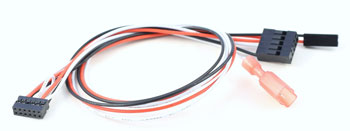
- M3-ATX(-HV) serial cable
- For changing M3-ATX(-HV) variables
- Cable lenght=300mm
Instructions :
1) Shut down your PC, remove power from M3-ATX
2) Connect serial cable, one end goes into the M3-ATX, the other end goes into the motherboard's internal COM connector (please refer to the motherboard's manual for connector location).
3) Apply power to the PC, startup PC.
4) Using Windows XP or Windows Vista, launch the M3-ATX-SRL.exe programm.
5)Select desired attributes (ex. Offdelay, Hardoff) from the drop down list.
6) Change desired setting.
7) Shut down PC.
8) Remove power from M3-ATX, disconnect the serial cable and
[more]


Please tell us your opinion. Rate the product on a scale from 1 to 5. A value of 5 means the best possible rating.
If you want you also can leave a comment.
Your ratings are honored on many ways. Your report will help other customers to better judge about the products. And
you can benefit from reports other customers are giving.
In addition we credit 0.50 EUR for each given rating with comment and 1.00 EUR for each given rating with comment (more than 150 characters)
on your account. The credit will be substracted automatically on your next order !
We reserve us the right to delete given comments (for example on attempts to give comments with senseless content, copying of other comments, inserting of foreign content, abusing the system for financing orders).
"Fair-use-policy" does apply (as of rule of thumb you should give comments for products which you have purchased already. And your credit account only in rare cases will have 2 or even 3 digits). The credit can only be withdrawn by placing an order. It is not possible to get the credit cash or transferred in an other way.
Customer ratings:
 Average rating, based on 9 ratings |
 from cricridam am 26.09.2009
|
from cricridam am 26.09.2009
|  | See all my comments
Chère pour un câble tout simple mais bon les réglages par défaut de la M3 ne me satisfaisaient pas alors au moins il rempli bien son rôle et permet bien la programmation de l'alimentation
from cracker am 07.04.2009
|
| See all my comments
wer das m3 atx hat ist es die einfachste und schnelleste anschluss möglichkeit
 from TheBrain am 31.03.2009
| See all my comments
from TheBrain am 31.03.2009
| See all my comments
Leider funktioniert die Programmierung an sehr vielen PC's nicht...so auch an meinem, an anderen soll es wohl gehen...keine Ahnung woran das nun liegt, aber ich probiere mal weiter. der Support hilft einem hier aber bestens.
A strong reason why I opted for the M3-ATX poer supply. Comes out with handy and comprehensive instructions to enable one program the M3-ATX. Wish it would either fit to the external serial port directly (connecting to the serial port header on the moherboard requires a bit of attention) or better to connect directly to a USB port.